

13 guides
API, SDKs & AI assistants
Connect an AI assistant, install an SDK, and automate orders, payments, DNS and service management safely.
API workflow
One integration path. Your choice of API, SDK, CLI or MCP.
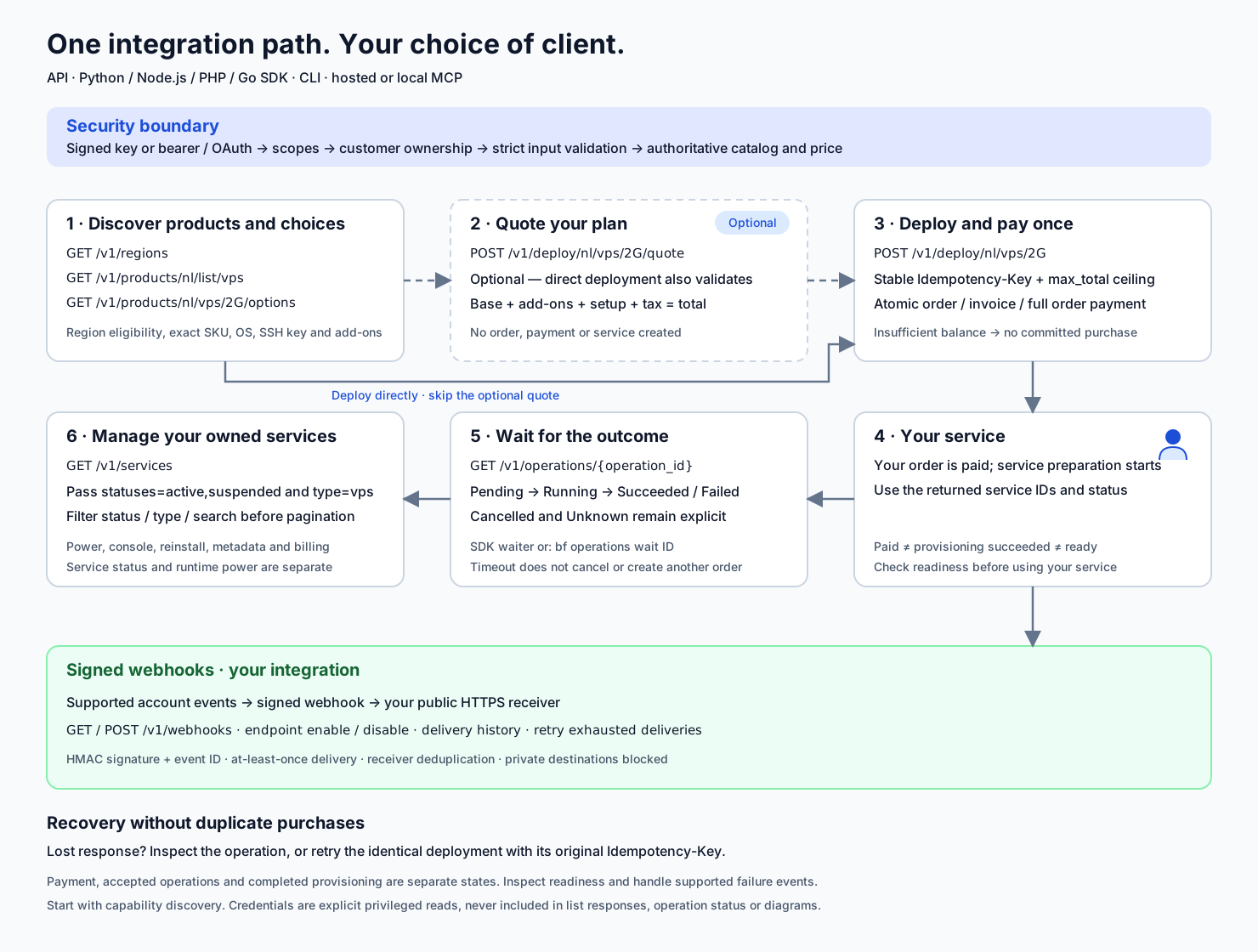
Signed key or bearer / OAuth → scopes → customer ownership → input validation → catalog and price checks
Discover products and choices
GET /GET /GET /Discover the region, exact SKU, OS, SSH key and add-ons.
Quote your plan
POST /Check the full price: base plan, add-ons, setup and tax. No order, payment or service is created.
Deploy and pay once
POST /Use a stable Idempotency-Key and max_total ceiling. Atomic deployment deducts the full final order amount from your account balance.
1 → 3 · Deploy directly, or use the optional quote first
Direct deployment also validates your configuration and price.
Your service
Service preparation starts. Use the returned service IDs and operation status; payment does not establish readiness.
Wait for the outcome
GET /Pending → Running → Succeeded / Failed. Handle Cancelled and Unknown explicitly. A timeout does not cancel the operation.
Manage your owned services
GET /Pass statuses=active,suspended and type=vps. Filters run before pagination. Service lifecycle and runtime power are separate.
Signed webhooks → your integration
Receive supported account events at your public HTTPS receiver. Verify the signature, deduplicate event IDs and handle repeat or out-of-order delivery.
Lost response? Recover the operation with its original idempotency key. Keep that key and the same payload for retries. Paid, accepted and completed are separate states.
Purchase and operation recovery guideChoose how to manage your services
Connect an AI assistant, use the command line, or build an integration with an SDK.
What you can automate by product
Compare public API, CLI, hosted MCP and local MCP coverage before building an integration.
Create an API key and connect securely
Create a key, select its permissions, configure credentials and make a first read.
Connect ChatGPT or another AI assistant
Sign in, choose what the assistant can access, and manage approvals in your dashboard.
Install an SDK or the command-line tool
Download Python, Node.js, PHP or Go, configure an API key and list your services.
Machine-readable purchase and operation recovery
Discover purchase requirements, request canonical receipts and recover a lost write response safely.
Use the CLI on Windows, macOS and Linux
Install the Python CLI, configure credentials and follow read-first product workflows.
Connect a local MCP client
Run the Python MCP server locally with an API key and understand its tool and credential limits.
Create an order and pay from account balance
Discover valid locations and OS choices, review the price, create an unpaid order and pay separately.
Create DNS zones and manage Website Protection
Start with an empty zone, template, JSON or zone file, then inspect records and protection.
API integration guide
Use SDKs, authenticate requests, paginate results and handle retries, idempotency and webhooks.
Troubleshoot API and AI connections
Resolve missing tools, denied access, expired keys and uncertain changes without repeating actions.
API endpoint reference
Find each public endpoint's parameters, required permissions and responses.
Couldn't find what you need?
Send us a support request and include the affected service.